
The other day while scrolling through LinkedIn, I came across a very informative post by Jun Zhang on using Groovy to update member names. The timing was perfect as we were in the process of having to update product member names in our EPM Planning application. I had been dreading the rename because until I saw this Groovy solution, it was going to be a painful process of either manually renaming over a hundred members or building a new hierarchy and reloading data. For the most part, our script is the same as Mr. Zhang’s. The differences are that we are updating the product dimension and including the alias in the process.
The first thing to do was to back up the application. It’s a good habit to have when making any kind of big change like this just in case something was to go wrong.
The next thing to do was to create a CSV file with the old member name, new member name, and the alias.
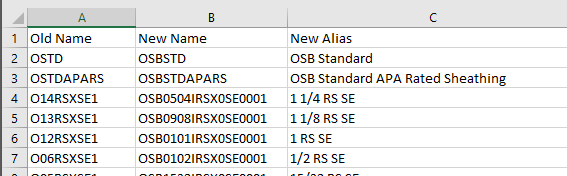
The CSV file was then uploaded to the Planning inbox.


Let’s break the Groovy script into pieces and explain each part. We start by defining variables for the file to use and the dimensions to be updated.

- Defining the file name that was uploaded and defining the dimension name
- Defining the cube and dimension based on the dimension name
The next section iterates through the file, identifies and defines old name, new name, and alias, and updates the outline.

- Iterates thru each row
- Creates a list and checks that the uploaded file has 3 columns based on that list
- Assigns the old member name, new member name, and alias to the respective columns in the file
- Uses the rename function to apply the new member names and assigns the alias to the default alias table. Since the alias naming happens after the member has been renamed, the function dimension.getMember needs to be used so the alias has a member to be applied to.
- Logging of successful renames and errors if encountered. The first error line is for errors other than an old member name not existing. The last error line is if the old member name does not exist.
If errors are encountered, the script should continue through the entire file until all rows have been processed. The log will show which members caused errors.
The rule can now be run, you can do so from calculation manager, or if you deploy the rule to Planning it can be run from there.
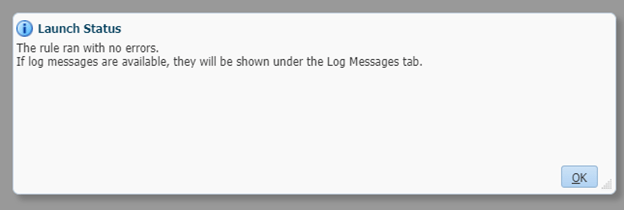
When the rule is complete, check the log file from the job console in Planning.
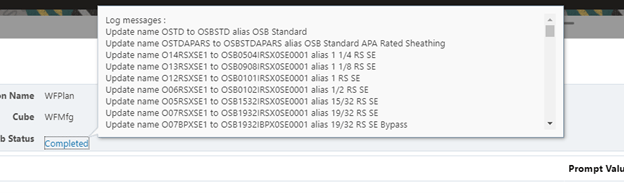
I find it easier to copy the log message and view in Notepad++. Good thing we did that because there was an error.
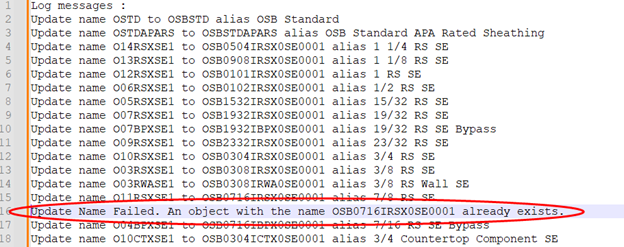
We missed a duplicate new name in the load file. Luckily, it was only one member, so we will do a manual rename of that member once we get a valid new name.
We also created a Smart View ad hoc to view the members and data to validate that members were renamed as expected, including alias’, and that the data was intact.
We can now run a database refresh.

You will also need to update any business rules that used the old member name. Unfortunately, rules do not update automatically with name changes like forms do.
Once you have this script in your toolbox, renaming members should become a painless process no longer to be cursed. Something I have not had the opportunity to test yet is how this will work on dimensions that do not exist in all cubes of the application. I expect that it will work as is, but without testing it I am not positive.
As always, happy EPM’ng!
P.S. Many thanks to my colleague Pedro Mariscal for working with me on this.
Here’s the full script.
String file_name = 'Update_ProductLine_Names.csv'
String dimension_name = 'Product Line'

Cube[] cubes = operation.application.getCubes()
Dimension dimension = operation.application.getDimension(dimension_name, cubes)

csvIterator(file_name).withCloseable() { rows ->
	rows.eachWithIndex { row, idx ->
		if(idx > 0) {
			List<String> file_member = row.collect{it.toString().trim() } as List<String>
			if( file_member.size() == 3) {
				def (String old_name, String new_name, String new_alias) = [file_member[0], file_member[1], file_member[2]]
				if(dimension.hasMember(old_name,cubes)) {
					Member dim_member = dimension.getMember(old_name,cubes)
					try{
						dim_member.rename(new_name)
                        	Member new_member = dimension.getMember(new_name,cubes)
                    		def memberAlias = new_member.toMap()
                        	memberAlias["Alias: Default"] =new_alias
                        	dimension.saveMember(memberAlias)
						println "Update name $old_name to $new_name alias $new_alias"
					} catch (Exception e) {
						println "Update Name Failed. $e.message"
					}
				} else {
					println "Update Name Failed. $old_name does not exist"
				}
			}
    	}
	}
} Random EPM Notes