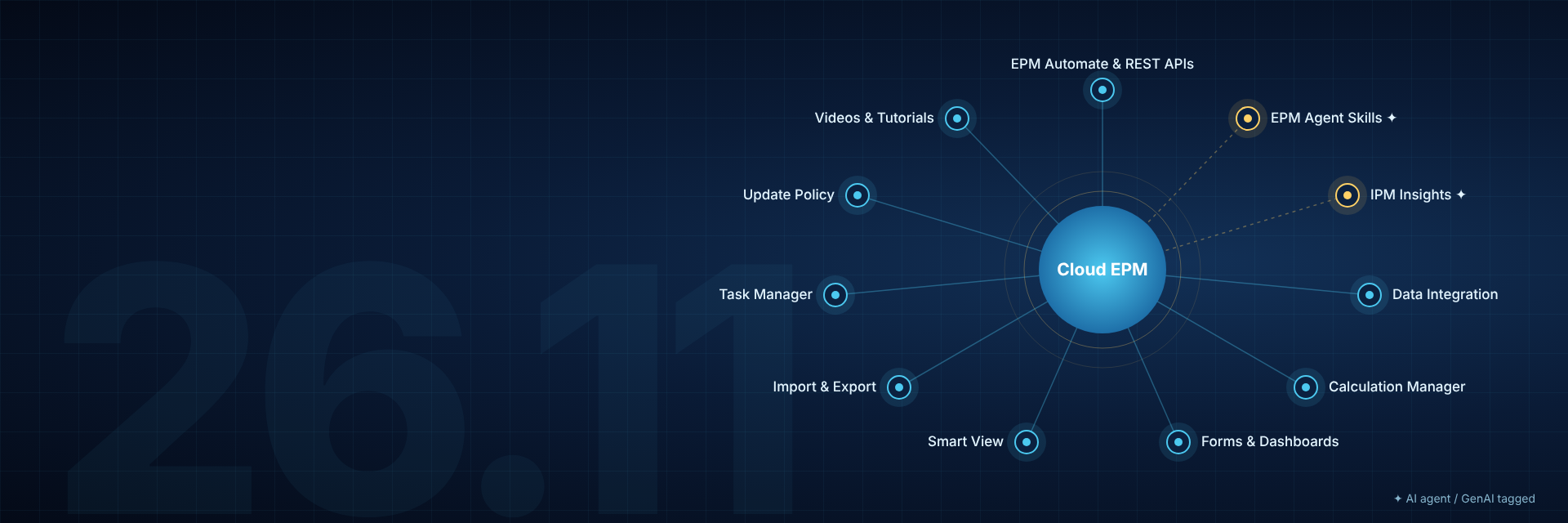

The November 2026 Oracle EPM updates are here. On the heels of AI World (which was amazing), these updates reinforce the direction of EPM in the age of AI. There are many REST APIs, EPM Agent Skills, and IPM Insights improvements. Updates will go to test environments November 6th and prod environments November 20th.
New Skills for Core Infrastructure Management Including Security, Audit, Migration, Activity Reporting, Essbase Diagnostics, and Concurrent Testing
What’s New: New Cloud EPM AI Skills for access administration, audit and activity reporting, files and snapshots, environment maintenance, security settings, Essbase diagnostics and exports, query limits, and concurrent usage testing are being introduced. These core AI skills support infrastructure administration. These all use the shared authentication skill and honor the rights and permissions set in the linked Cloud EPM environment for the user invoking the skill. These new skills bring a conversational interface to administrators for many of their regular tasks.
Access Control and Identity Reports
- What It Means: This skill is for reviewing access permissions, assignments, and login history. Reports include user and group role assignments, user logins, invalid logins, user access, and assignment audits.
- My Take: A great enhancement that will make administrators jobs easier around access control. Putting all these reports into a skill will provide efficient and repeatable processes for administrators allowing them to focus on the problem areas.
Environment, Services and Maintenance
- What It Means: This skill is for managing service operations, maintenance schedules, environment recovery, and communications. This includes service inspection and reading the daily maintenance time settings, inspecting session timeout and skipped updates, and reviewing email domain policy. Also included is support for registered operations for maintenance changes, service restart or recreation, environment cloning and restoration, outbound email, and feedback submission.
- My Take: These skills will allow us to more easily perform tasks for executing and monitoring environments. I particularly like the ability to do service restarts and cloning.
Essbase Block Analysis
- What It Means: This skill is for generating diagnostic information about Essbase blocks with the block analysis report, and check the associated diagnostic job status.
- My Take: This is another tool for administrators to troubleshoot performance issues. The information is already available in EPM, but the skill gives administrators another way to get it.
Essbase Data Export
- What It Means: This skill allows cube data to be extracted.
- My Take: I can picture a lot of usage of this skill. We often have requirements to extract data for use in other places, having a skill to do this will make the process easier and more efficient.
Files, Object Storage, and SFTP
- What It Means: This skill manages repository files and supported transfers, including listing the files, downloading, preparing an upload, deletions, and copying between EPM and supported object storage, SFTP, or another EPM instance.
- My Take: This can help simplify and control processes around file maintenance. We often have to download and upload files and while existing tools get the job done, having a skill to do it is likely better for the process.
Identity and Access Management
- What It Means: This skill manages user identities, groups, memberships, and role assignments. Administrators can list users and groups, and create groups, add members, or update role assignments.
- My Take: EPM groups can be challenging to maintain, this should make it easier. Imagine asking “List all the groups Jane Doe is in”, reviewing it, then saying, “Remove user from Group1” or “Add Sally Que to the same groups as Jane Doe”. That’s a lot easier than downloading, uploading, or clicking through the application.
Migration and Application Snapshots
- What It Means: This skill manages lifecycle management activities for application snapshots, artifacts migration, and transfer of backups. It can provide lists of snapshots, categories, artifacts, available backups, and import options. It can also prepare exports, imports, copies, and renaming of snapshots.
- My Take: I see myself using this to ease the process of migrating specific artifacts from Test to Prod. Something like “Migrate form ABC from Test to Prod”, at least I hope it’s that simple.
Query Governor Settings
- What It Means: This skill manages Essbase query execution time settings. Administrators can inspect the configured query time limit and review proposed adjustments.
- My Take: This is yet another improvement that will help administrators in their daily jobs.
Security Administration
- What It Means: This skill manages environment security controls, including virus scanning on upload, restricted data access for Provide Feedback, Oracle manual database access, and the environment encryption key.
- My Take: Looking at this one with the other skills around access control and management, administrators should become more efficient and effective. They will be able to maintain and troubleshoot quicker and easier, and spend their time on other tasks.
Simulate Concurrent Usage
- What It Means: This skill runs defined concurrent user workloads. You can start a concurrent usage simulation and check the job status.
- My Take: I’ve been a fan of simulate concurrent usage since it first came out, so anything to make it easier to use and increase its usage makes me happy.
User Activity Reports
- What It Means: This skill lists and retrieves access logs and environment activity reports.
- My Take: Like I said above, looking at this with the other skills around access control and management, administrators should become more efficient and effective.
New Platform Data Exploration Skill
- What’s New: This skill helps with inspecting applications, cubes, dimensions, members, forms, dashboards, and selected Planning values through the packaged EPM Client Library. A direct metadata question goes straight to the relevant operation. A data question finds a relevant form or a form you name.
- What It Means: Users will be able to ask questions around metadata and data within Planning.
- My Take: This is what many of us have been waiting for, direct ability within EPM to ask questions about data. Sure, we can do it with other AI tools and MCP servers, but this makes it easier (and more secure) to be in EPM.
OAuth 2.0 Support for Cross-Environment Connections
- What’s New: Cross environment connections can be created using OAuth 2.0 protocol. The identity domain of the target environment needs to be configured to accept OAuth 2.0 connections.
- What It Means: REST APIs can seamlessly connect across environments.
- My Take: Having this enhanced integration of EPM environments across domains reinforces the strength of EPM as a connected planning solution. No matter where the data is within EPM, we can get to it in a safe and secure manner.
New Oracle Fusion Application Cloud Provider Connection Type for Cross-Environment Connections
- What’s New: The new connection type Oracle Fusion Application Cloud Provider establishes cross environment connections to Fusion Cloud ERP.
- What It Means: Secure server-to-server integration between Cloud EPM and Cloud ERP.
- My Take: As I noted above, integration of environments in a safe and secure manner is a good thing. Adding a connector for integrating EPM and ERP is a logical enhancement.
New Cloud EPM Platform REST APIs
- What’s New: REST APIs to support Cloud EPM features in the Data Exploration EPM Agent skills.
- What It Means: These platform APIs are used in the Data Exploration skills for application and object discovery, forms, dashboards, dimensions and members, cubes, and jobs.
- My Take: This is the listing of the underlying APIs used in the Data Exploration skill. Refer to the Oracle documentation for the full listing.
New REST APIs for Dashboard Authoring and Data Operations
- What’s New: REST APIs to create, retrieve, update, replace, and delete Planning dashboard definitions. This includes updating dashboard components and retrieving dashboard data.
- What It Means: Dashboard authoring and usage can be automated, thus reducing manual efforts. External applications can retrieve dashboard data. Data updates can be submitted to writable form components.
- My Take: I’d like to know what Oracle means by “external applications”. Is this going to give us the ability to have an EPM dashboard in Excel? What value does retrieving the data from a dashboard provide?
New REST API for Retrieving Planning Insight Details
- What’s New: REST API to retrieve Insight details including metadata, status, and data slice information.
- What It Means: Automated retrieval of Insight details for reporting and integrations.
- My Take: This is good information to be able to retrieve and use elsewhere. Insights provide valuable information, utilizing it elsewhere instead of only within EPM will be very beneficial.
EPM Assistants: IPM Insights Assistant
- What’s New: EPM Assistants allow administrators to download AI agent templates for integrating Cloud EPM or EDM with Fusion AI Agent Studio. The IPM Insights Assistant enables agentic applications to retrieve, validate, and present IPM Insights.
- What It Means: Accelerates adoption of IPM Insights by providing a reusable integration layer.
- My Take: IPM Insights is a great tool, but adoption has been slow. If this can provide a more compelling use case for teams to use Insights, then great.
IPM Insights: Insights Analysis
- What’s New: Insights Analysis helps to investigate variances, anomalies, and gaps between forecasts and predictions. The analysis includes Key Contributor and Variance Decomposition.
- What It Means: Key Contributor Analysis explains where the variance is. Variance Decomposition Analysis explains what makes up the variance. This analysis helps to understand why exceptions occur and gives analysts a tool to be more efficient and effective.
- My Take: IPM Insights was already providing great information in my opinion. Adding in this analysis capability makes it even more useful.
IPM Insights: Ability to Show Top Insights in Dashboards
- What’s New: Dashboards 2.0 can now include the top Insights.
- What It Means: Displaying top insights will help users quickly identify and act on key findings. The dashboard can also be used as a landing page so it is the first thing the user sees when they login. They say a picture is worth a thousand words…
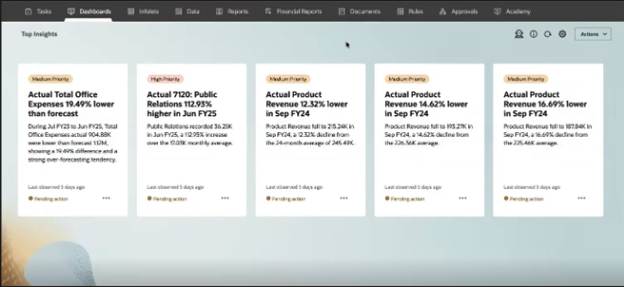
- My Take: This is a very cool enhancement. Anyone who has been using Insights knows how challenging it can be to find relevant insights when the page has dozens of findings. Highlighting the top ones makes it much more user friendly.
New Version of Oracle Smart View for Office
There is new version of Smart View. As always, I recommend updating Smart View to the latest version.
Updated Narrative Reporting Extension for Smart View
There is an updated Narrative Reporting extension for Smart View. As always, I recommend updating Smart View extensions when they are available.
IMPORTANT Actions and Considerations
There did not appear to be any new content in Important Actions and Considerations this month, so I am leaving last month’s items here.
Generative AI Features Require Cloud EPM 26.08 or Later by the End of January 2027
Generative AI functionality will require the August (26.08) or later update of Cloud EPM by the end of January 2027. Any environment that is not upgraded to 26.08 or late update by the end of January 2027 will no longer have access to Generative AI features.
Applies to: Account Reconciliation, Enterprise Data Management, Enterprise Profitability and Cost Management, Financial Consolidation and Close, FreeForm, Narrative Reporting, Planning, Profitability and Cost Management, Tax Reporting
EPM Automate Clients Earlier Than 26.09 Will Not Work with 26.12 and Later EPM Cloud Environments
Starting with the December (26.12) update, Cloud EPM environments will no longer support EPM Automate clients bundled with the 26.08 update or earlier.
Beginning with the 26.09 update, EPM Automate will change the format of the encrypted password (.epw) file to enhance its security. Cloud EPM environments on 26.09, 26.10, and 26.11 updates will be able to read the legacy .epw file format and the new file format created by EPM Automate that will be bundled with the 26.09 update.
Starting with the 26.12 update, Cloud EPM environments will accept only the new .epw file format generated by EPM Automate 26.09 or later.
To avoid authentication failures, Oracle recommends that you complete these steps after your environment is updated to 26.09. You must complete these steps before you can use EPM Automate to access 26.12 Cloud EPM environments:
- Upgrade EPM Automate to version 26.09 or later.
- Run the EPM Automate encrypt command to generate a new .epw file in the updated format.
The new .epw file will work with all Cloud EPM environments on update 26.09 or later.
Applies to: Account Reconciliation, Enterprise Data Management, Enterprise Profitability and Cost Management, Financial Consolidation and Close, FreeForm, Narrative Reporting, Planning, Profitability and Cost Management, Tax Reporting
This was a big update for APIs and AI features. I only covered a portion of it, be sure to read the full Oracle document for all the details on what I covered as well as items I did not mention.
As always, happy EPM’ng!

